A customer does not come to an ecommerce store hoping to study a catalog. They come because they need something to work: a refrigerator that fits their kitchen, a desk that fits their room, or a replacement that arrives before an existing product fails.
That is where I start with ecommerce merchandising: organizing, presenting, and prioritizing products so customers can find suitable options, understand the differences, and make a confident purchase. It includes categories, filters, search, product cards, comparisons, recommendations, and the commercial rules behind them.
My perspective comes from ecommerce marketing, including my work at Atlantic Restaurant & Supermarket Equipment. In a catalog where competitors can sell the same products, the quality of the buying experience becomes part of what the customer is buying. More products do not automatically create a better store. Sometimes they simply create more decisions.
Disclosure: I work at Atlantic. The public category pages below are examples from that business, not independent endorsements. I distinguish observed features from proposed improvements. This article does not claim a measured conversion uplift; hypothetical calculations are labeled as such.
In this guide
- Merchandising is more than making products look attractive
- When the advertised price cannot be your main advantage
- Start with the customer’s job, not your supplier spreadsheet
- Example one: commercial refrigerators and meaningful narrowing
- Example two: walk-in products and the cost of an incomplete comparison
- Good merchandising starts in product data
- Filtering and sorting solve different problems
- Which products should appear first?
- Treat site search as a merchandising conversation
- How I would implement a Shopify merchandising plan
- Recommend the next useful thing, not simply another thing
- Measure better decisions, not just more clicks
- A practical 30-day ecommerce merchandising audit
- Ecommerce merchandising questions
- The product is not the whole offer
Merchandising is more than making products look attractive
Visual merchandising matters. Photography, spacing, hierarchy, and consistent presentation help people understand a page. But a beautiful grid can still be commercially weak if shoppers cannot tell what is included, which product fits, or why one model costs more.
I think of the work in three layers:
- Find: Can a customer reach a relevant set of products?
- Choose: Can they identify meaningful differences without opening every product?
- Commit: Do they understand availability, delivery, compatibility, and the next step?
A failure at the first layer looks like a navigation problem. A failure at the second often looks like indecision. A failure at the third can appear as cart abandonment. Treating all three as a need for a bigger discount misses the actual problem.
This is also why merchandising is not interchangeable with SEO. My category page SEO guide focuses on discoverability and useful category pages. Here, the central question is what happens after someone arrives: does the store help them choose?
When the advertised price cannot be your main advantage
At Atlantic, manufacturer MAP policies are part of the commercial context. MAP means minimum advertised price. The terms of individual policies vary; I do not treat MAP as a statement that every seller must have the same final transaction price, or that every product is covered.
The practical marketing question is more useful: when I cannot rely on advertising a lower price for a comparable product, what can make my store the easier place to buy?
Clear product information. An understandable assortment. Honest availability. Help with configuration. A transparent delivery process. A relevant answer instead of a generic sales message.
That connects directly to Same Product Better People. “Better people” should not remain a slogan about service. Their knowledge should become visible in the product data, the comparisons, and the questions a store answers before a customer has to call.
Start with the customer’s job, not your supplier spreadsheet
A supplier organizes information to describe its range. A customer organizes information around a problem. Those are not always the same structure.
For a commercial equipment buyer, the first question might be whether the equipment fits the available space. The second might be whether the configuration suits the operation. Brand may matter, but it may not be the first decision. In another category, brand could be essential because the customer is replacing a specific model.
Before changing a collection, I would collect a small set of real questions from sales and support, then map each one to a shopping task:
| Customer question | Store response | What must be reliable |
|---|---|---|
| Will it fit? | Dimensions, a useful filter, and a specification link | Units, external dimensions, required clearances |
| What is included? | A visible package/configuration summary | Included and excluded components |
| Which option is right for my use? | Comparison or short selection guide | Verified suitability, not guessed use cases |
| When can I use it? | Dispatch and delivery information with clear limitations | Inventory source, lead time, installation scope |
| What else do I need? | Compatible accessories or a specialist handoff | Compatibility and any required professional checks |
This table is a planning framework, not a description of every feature currently implemented at Atlantic. The point is to connect each merchandising choice to a customer question rather than adding features because another store has them.
Example one: commercial refrigerators and meaningful narrowing
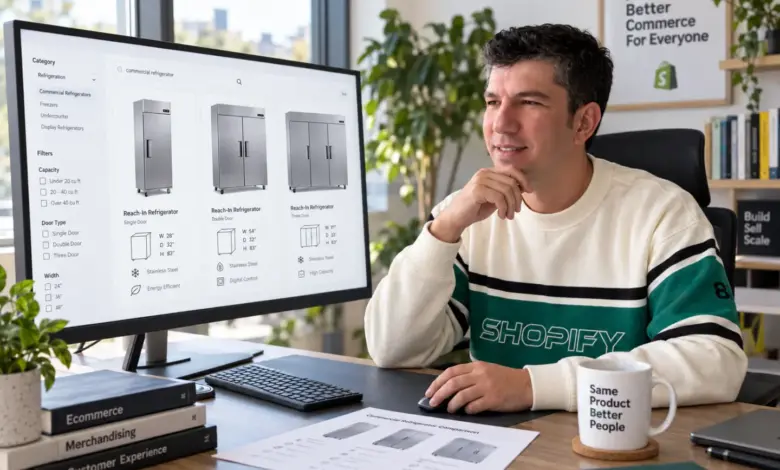
On the Atlantic commercial refrigerator collection, customers can move into product types such as reach-in, glass-door, undercounter, and worktop refrigerators. At the time of review, visible filters included brand, price, number of doors, voltage, door type, and door style. These are observed page features, not a claim about their effect on sales.
The useful merchandising question is whether that narrowing sequence matches the buyer’s task. A customer replacing a glass-door display unit is not necessarily comparing the same options as someone equipping a back-of-house prep area.
My proposed next step would be a task test: ask a few representative buyers to find an option for a defined space and use case, without coaching them. Record which terms they understand, where they hesitate, and whether they need information that is absent from the list. A small qualitative test finds issues; it does not establish a statistically reliable conversion lift.
I would not add more filters automatically. I would first ask whether the existing attributes are complete and whether the most important decisions are visible. An additional filter with inconsistent data can hide a suitable product and make the experience worse.
Example two: walk-in products and the cost of an incomplete comparison
The Atlantic walk-in collection illustrates a different challenge. The reviewed page distinguishes floor configuration and refrigeration options, and the catalog includes products with and without refrigeration. The page also provides size, cost, refrigeration, and floor guidance.
This creates a merchandising issue that a simple “price: low to high” sort cannot resolve: two listed prices may describe different packages. A cheaper box is not automatically a cheaper complete project.
My proposed comparison would bring the package difference forward, before the shopper commits to a shortlist:
| Decision | Option A | Option B |
|---|---|---|
| Package | Box-only listing | Box plus listed refrigeration components |
| Displayed price means | Price for the stated box configuration | Price for the stated package |
| Still to verify | Refrigeration selection and other project requirements | Exact included components and project requirements |
| Before ordering | Confirm specifications and complete scope | Confirm specifications and complete scope |
The comparison should never suggest that a listed package necessarily includes installation, permits, electrical work, or every site-specific requirement. A qualified specialist must verify suitability. From a merchandising perspective, the job is to expose the unanswered questions, not disguise an engineering decision as a simple upsell.
The same principle applies beyond equipment: a camera body versus a lens kit, a bed frame versus a mattress bundle, or software with different support packages. Compare equivalent scope, or explain why the scope differs.
Good merchandising starts in product data
I would rather fix an unreliable attribute than build another promotional banner. Product data is what allows a category, filter, comparison, search result, and recommendation to tell a consistent story.
For each decision-critical attribute, define its meaning, type, source, owner, and review rule. “Width” should not mean external width on one product and usable internal width on another. “Available” should not quietly mix warehouse stock, supplier stock, and a made-to-order lead time.
| Field | Rule to document |
|---|---|
| Dimensions | Measurement type, unit, and source document |
| Included components | Explicit list; do not infer from a photograph |
| Compatibility | Verified reference or specialist approval |
| Availability | Source, refresh frequency, and customer-facing wording |
| Lead time | Dispatch versus delivery, with conditions |
| Missing information | Visible unknown state or review queue, not an invented value |
AI can help normalize text and flag missing fields, but it should not invent technical specifications. If a product lacks a reliable compatibility value, mark it for review. I cover that distinction in improving product pages with AI without losing trust.
Filtering and sorting solve different problems
A filter removes options outside a condition. Sorting changes the order of the remaining options. The difference matters when a preference is flexible rather than absolute. A shopper might prefer a lower price without having decided on a hard budget.
Baymard’s research discusses this distinction through category-specific sorting: the right ordering can support preferences that are awkward to express as rigid filters. That supports a useful design principle, not a promise of a particular uplift for your store. See Baymard’s research discussion.
My preferred sequence is:
- Identify the attributes that make a product unsuitable.
- Make those attributes easy to filter when the data is dependable.
- Offer meaningful sorting for the remaining preferences.
- Show selected filters clearly and make them easy to remove.
- Test empty results, back navigation, and the mobile filter panel.
If filtering produces no results, explain what happened and offer a reversible way to broaden the selection. Do not silently discard a customer’s constraints to show more products.
Which products should appear first?
“Featured” is a decision, even when nobody remembers making it. I would make its rules explicit and separate eligibility from ranking.
Eligibility comes first: does the product fit the category, match the selected constraints, have adequate information, and have an honestly represented purchase path? A high-margin product that is incompatible with the customer’s requirement should not win a ranking calculation.
Among eligible products, I would consider relevance, confirmed availability, delivery expectations, evidence of customer demand, and commercial contribution. The order depends on the category and buyer task. There is no universal scoring formula that deserves to run unreviewed across the entire store.
New products also need a fair opportunity to be discovered. Ranking only by historical sales can keep established products visible while new options receive little exposure. A limited, relevant new-product placement is something to test, with availability and customer fit still acting as constraints.
Manual promotions need an owner and an expiration date. A holiday placement that remains months later is not a strategy; it is an unfinished maintenance task.
Treat site search as a merchandising conversation
A shopper can search with an exact model, a product type, a use case, or a problem. I would audit those separately. A model-number search should not behave like an inspirational browse query.
Start with actual search logs where available, while avoiding personal data in reporting. Review high-frequency searches, no-result searches, and searches that lead to repeated reformulation. Check whether the product exists before blaming the search engine.
On Shopify, Search & Discovery supports product boosts for selected search terms. That is useful for controlled promotion, but not a reason to push an irrelevant product above a better match. Shopify documents search modifications here.
My audit would include an exact SKU, a common product name, a likely spelling variation, a compatibility phrase, and a query with no suitable products. Write the expected behavior before testing. Do not convert terms with different technical meanings into blanket synonyms just to remove zero-result searches.
How I would implement a Shopify merchandising plan
I would begin with one commercially important collection, not a storewide redesign.
- Audit the assortment: identify duplicates, missing specifications, ambiguous packages, and unavailable products.
- Define structured fields: choose consistent product attributes and metafields for the decisions customers need to make.
- Build the customer route: collection links, relevant filters, list information, and comparison guidance.
- Set ranking rules: record what qualifies for featured placement and when it is reviewed.
- Test search and recommendations: check relevance and compatibility rather than accepting defaults blindly.
- Verify mobile behavior: filters, applied values, product cards, and return-to-list position.
Shopify’s native filtering depends on theme support and supported data sources. Its documentation currently notes that collections above 5,000 products do not display native filters. Check the current limits before designing around one enormous collection; third-party search systems may behave differently. Shopify filter documentation.
This is not a recommendation to create hundreds of thin collections. The merchandising structure should follow meaningful customer needs. Indexing and SEO treatment are a separate decision, covered in my category SEO guide.
Recommend the next useful thing, not simply another thing
Related products can mean alternatives, complementary items, or an upgrade. Those are different intentions and should be labeled clearly.
An alternative helps someone find a better fit. A complementary item helps complete the purchase. An upgrade needs an understandable benefit. Mixing all three under “You may also like” can leave the customer doing the interpretation.
For technical products, compatibility is a requirement, not a similarity score. If compatibility has not been verified, direct the customer to confirmation rather than presenting the pairing as certain. For products that do not require accessories, a useful guide may be a better recommendation than another SKU.
This is also a connection to customer retention: the best outcome is not merely a larger first basket, but a purchase the customer can actually use.
Measure better decisions, not just more clicks
A higher product-card click rate can mean that the list is more relevant. It can also mean customers must open more pages because essential information disappeared. A lower click rate could be positive if a clearer comparison helps people choose faster. Metrics need context.
| Measure | What it can help explain | Guardrail |
|---|---|---|
| Product-list click-through | Discovery and list relevance | Check downstream purchases or qualified inquiries |
| No-result searches | Vocabulary or assortment gaps | Do not solve them with irrelevant matches |
| Purchase or qualified inquiry rate | Whether visitors progress toward a useful outcome | Use a consistent denominator and attribution window |
| Contribution per session | Commercial value after defined variable costs | Include returns and discount effects where measurable |
| Wrong-item returns or support questions | Whether choices match expectations | Allow for delays and differences between product categories |
Illustrative calculation: suppose 10,000 eligible collection sessions produce 200 orders, a 2% purchase rate. If a comparable period produces 220 orders from the same number of sessions, that is 2.2%: an increase of 0.2 percentage points, or 10% relative. It is not proof that a merchandising change caused the increase.
Traffic mix, stock, price, seasonality, and promotions could explain part of the difference. Use a randomized test where feasible, define the primary metric in advance, and keep an eye on margin and customer outcomes. For low-volume B2B categories, task testing and qualified inquiry review can reveal problems while sales data accumulates.
I would also avoid treating search users versus non-search users as a causal experiment. People who search may already have different intent. Similarly, an inquiry and a later order from the same customer should not be counted as two independent wins without a clearly defined reporting model.
A practical 30-day ecommerce merchandising audit
| Week | Work | Deliverable |
|---|---|---|
| 1 | Choose one collection; review customer questions, data and baseline behavior | Prioritized problem list and measurement definitions |
| 2 | Correct missing attributes and ambiguous package information | Verified data and revised product-card requirements |
| 3 | Improve one discovery or comparison problem | Testable change with documented ranking/filter rules |
| 4 | Review usability, mobile behavior and early business signals | Keep, revise or investigate decision with limitations recorded |
Thirty days is a work plan, not a promise that every category will generate enough orders for a conclusive experiment. Keep a change log. If you alter photography, sorting, pricing, filters, and advertising at once, it becomes much harder to understand what helped.
For a store that is not yet live, add these checks to the ecommerce launch checklist. For an established store, start with an important category where customer confusion is already visible.
Ecommerce merchandising questions
What is the difference between ecommerce merchandising and ecommerce marketing?
Marketing includes attracting demand and building relationships across channels. Merchandising focuses on how the store’s assortment is organized and presented to help customers choose. They overlap: a campaign should lead to a collection that fulfills the promise made in the ad or email.
Is visual merchandising the same as ecommerce merchandising?
Visual presentation is one part. Product data, assortment, filters, ranking, search relevance, availability, and comparison are also merchandising decisions. A visually polished page can still make the wrong products easy to buy.
Should best sellers always appear first?
No. Historical sales are one signal. Suitability, availability, buyer intent and the opportunity to evaluate new products matter too. A best seller that fails a customer’s requirements is not the best recommendation.
Do I need an expensive merchandising platform?
Not necessarily. A focused collection audit and dependable product information can come before another subscription. Choose software when you can identify the job it needs to do and how you will verify that it does it.
Can AI do ecommerce merchandising?
AI can assist with classification, missing-data detection and recommendations. It still needs reliable inputs, clear commercial constraints, and human review where compatibility or technical suitability matters. Automating an unreliable catalog spreads the problem faster.
The product is not the whole offer
Two stores can sell the same model. They do not necessarily sell the same level of clarity.
One makes the customer interpret a long title, guess what is included, and ask basic questions that the page could have answered. The other makes the differences understandable and knows when to bring a knowledgeable person into the decision.
That is the standard I want ecommerce merchandising to meet: not simply moving products higher on a page, but helping the right customer choose the right product with fewer avoidable mistakes. In a market where the product itself is not exclusive, that work is a meaningful part of the offer.