An ecommerce website can be live before the business behind it is ready. The pages load. The logo looks right. Products have prices. But who receives a customer’s question? Can the store send a password reset? Does a purchase appear once or three times in the reports? And can the team deliver what the first campaign promises?
That is where I start. Before asking how to bring more people to a store, I want to know what will happen when they arrive. Ecommerce marketing begins with the ability to make a useful promise, support it with evidence, and keep it after payment. Advertising is only one part of that system.
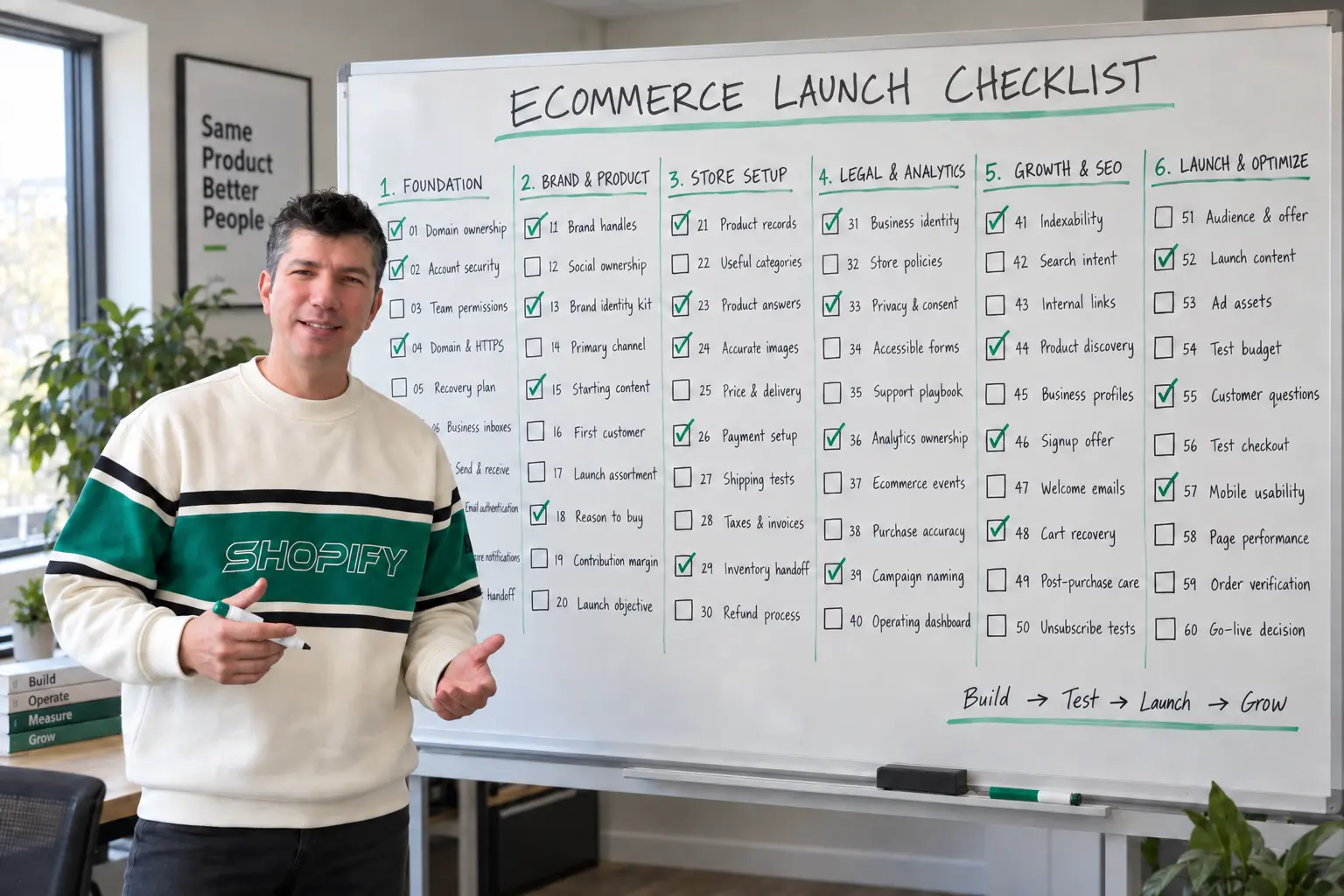
This ecommerce launch checklist is for a store that has just been built, is preparing to launch, or is already live but has never been checked end to end. It covers business email, social media accounts, product information, checkout, SEO, analytics, customer communication, and the first marketing experiments. Shopify is a recurring example, but the operating principles also apply to WooCommerce and other platforms.
The short answer: secure your accounts, establish working two-way communication, verify the offer and checkout, configure consent-aware measurement, make the catalog discoverable, and complete a real customer journey before increasing traffic. Then launch one focused acquisition experiment and improve the experience using what actually happens.
This is my operating framework, informed by the official documentation linked throughout. The business scenarios and budget calculations are illustrative, not client results. Legal, privacy, tax, and platform obligations depend on your products and markets; use qualified advice for your situation. Documentation reviewed September 23, 2026.
What should you do first after creating an ecommerce website?
I separate work into three gates. Before accepting orders: ownership, security, working contact routes, accurate product information, payment, shipping, and applicable customer protections. Before paid promotion: a tested landing page, trustworthy measurement, consent controls, support coverage, and a spending limit. After launch: expand content, improve conversion, develop retention, and add channels selectively.
These are dependencies, not an invitation to spend six months preparing. A five-product store can start with a small, complete system. A distributor with thousands of products and freight delivery needs more operational checks. Neither benefits from an abandoned TikTok account and ten untested marketing apps.
For every task, record an owner, a status, and evidence. Evidence could be a received email, an order number, an approved product feed, or a screenshot of a successful permissions test. “Installed” and “working” are different statuses. My definition of complete is that the intended outcome has been demonstrated.
1. Own and secure the business infrastructure
The first marketing asset is not an advertisement. It is control. If a freelancer owns your domain, an employee is the only account administrator, or a recovery message goes to an abandoned inbox, the brand is operating on borrowed access.
-
Put the domain under the business’s control
Confirm the registrar account, registration contact, renewal settings, payment method, and recovery route. Choose a monitored recovery address that will remain accessible if the store’s own domain or email service fails. Keep a secure record of who can change DNS. Check: the authorized owner can sign in without asking an outside contractor for credentials.
-
Protect administrative accounts and recovery
Use unique passwords in a password manager and enable supported multifactor authentication or passkeys. Protect the registrar, store, email, payment provider, and marketing accounts first. Save recovery codes securely; do not put them in a public project document. Check: complete a recovery-readiness review without disabling the existing working login.
-
Give people roles, not a shared master password
Invite staff and partners through the platform’s permission system. Match access to actual responsibilities and plan how to remove it when work ends. A campaign assistant rarely needs access to payouts or domain ownership. Check: a restricted account can do its assigned work but cannot change sensitive settings.
-
Make the domain, HTTPS, and preferred URL consistent
Choose the primary hostname, verify the certificate, and redirect alternate versions appropriately. Test important URLs as a logged-out visitor. Keep development environments private. If replacing a previous site, map old valuable URLs to relevant new destinations rather than redirecting everything to the homepage. Check: there are no certificate warnings or redirect loops in the buying path.
-
Create an asset register and a recovery plan
Record account IDs, owners, billing contacts, integrations, renewal dates, and where credentials are stored, without exposing the credentials themselves. Back up the data and configuration your platform allows, and understand what a restore would actually recover. Check: someone other than the original implementer can identify the responsible person and recovery procedure.
Completion gate: the business owns its identity, authorized people can work, and losing one person’s device does not mean losing the store.
2. Set up business email that receives, sends, and gets answered
I think about email as three separate jobs: human conversations, essential store notifications, and permission-based marketing. They can share a brand identity without relying on the same technical delivery system.
-
Create the customer-facing addresses you will actually monitor
Start with a general address using
helloat your brand’s domain and a support address. Add wholesale, sales, returns, or press addresses when they serve a real workflow. These can be aliases into a shared inbox; five addresses do not automatically require five paid mailboxes. Check: each published address has a named person or team responsible for it. -
Verify two-way communication, not just forwarding
A receiving or forwarding rule does not, by itself, configure authenticated sending from the same address. Set up an authorized mailbox or outbound service appropriate to the job. Check both the visible sender and reply-to address. Check: send from an unrelated account, receive the message, reply as the business, and confirm the reply arrives with the intended identity.
-
Authenticate each sending service
Follow each provider’s DNS instructions for SPF, DKIM, and DMARC, checking alignment with the visible sender. Inventory existing senders before changing DNS; do not blindly paste conflicting records. Google’s requirements distinguish ordinary senders from bulk senders, and authentication alone does not guarantee inbox placement. Check: inspect a delivered message’s authentication results for every sending system. See Google’s sender guidelines.
-
Separate notification reliability from marketing delivery
Configure the platform’s supported delivery method for orders, password resets, contact forms, and staff alerts. A WordPress form’s success message is not proof that a notification arrived. Keep critical transactional messages independent of promotional subscription status. Check: trigger each notification from the actual storefront and verify both the customer message and the internal alert.
-
Test delivery, failure handling, and the support handoff
Test representative Gmail, Outlook, and iCloud recipients where available, including spam folders. Confirm that replies reach a person, bounced addresses are handled, and unresolved requests remain visible. Never mark every customer issue complete just because an automated reply went out. Check: one realistic product question moves from submission to a useful human answer.
Completion gate: customers can contact you, the store can contact them, and someone owns the conversation. Email is part of the buying experience before it becomes a campaign channel.
3. Establish your social media identity without creating unnecessary work
My distinction is simple: reserve the identity you may need; actively operate the channels you can support. An empty account is not a marketing strategy, and posting everywhere can leave a small team with no time to improve the store.
-
Reserve sensible, consistent brand handles
Check the brand name on relevant platforms before commissioning assets that depend on a particular username. Record the chosen handles and profile URLs. If the exact name is unavailable, choose a clear variation rather than an unreadable string of punctuation. Check: customers can recognize that the website and social profiles belong to the same business.
-
Use business ownership and delegated access where supported
Create the appropriate business or professional assets, then assign access through the platform rather than sharing personal logins. Preserve legitimate individual account ownership where a platform requires it. Meta’s business portfolio training covers assets, permissions, and security. Check: removing an agency’s access would not remove the business’s control of its own assets.
-
Prepare a small brand identity kit
Keep a legible avatar, horizontal and square logo versions, cover imagery, a short description, an approved product description, and the canonical website link together. Write a plain-language positioning sentence before filling bios. Check: the avatar remains recognizable on a phone and no profile makes a promise the store cannot honor.
-
Choose a primary channel around the buying process
For a visually demonstrated product, a short-video channel may be worth testing. For complex B2B equipment, search-led explanations or professional relationships may be a better starting hypothesis. These are choices to validate, not universal channel rules. Check: you can explain who uses the channel, what question you will answer, and where interested visitors should go next.
-
Publish a useful starting set and assign inbox coverage
Introduce the business, show the product in context, answer a buying question, and explain how support works. Link each item to a relevant page when appropriate. Decide who checks comments and direct messages, including during campaigns. Check: a stranger can understand what you sell and get a response without hunting for the founder’s personal account.
Completion gate: your public identity is coherent, ownership is protected, and at least one channel has a realistic purpose and operating plan.
4. Define the customer, offer, and economics before buying traffic
A technically complete store can still give people no convincing reason to buy. I want a specific buyer, a specific decision, and a reason to choose this store that survives a comparison with another seller.
-
Describe the first customer and purchase situation
Replace “anyone who likes quality” with a practical scenario: a restaurant replacing failed refrigeration, a parent choosing a first floor bed, or someone replenishing a product they already use. Identify urgency, constraints, and the consequences of choosing badly. Check: the team can name the first buyer’s main unanswered question.
-
Choose a focused launch assortment
Select products you can explain, stock or source reliably, and support. A large imported catalog creates maintenance work before it creates demand. Identify the initial category or use case that deserves the best content. Check: the promoted products have verified availability, accurate information, usable images, and a clear fulfillment owner.
-
Write the reason to buy without relying on empty superlatives
Translate strengths into evidence: verified compatibility guidance, understandable freight information, original demonstrations, responsive product advice, or a useful assortment. If advertised prices are constrained by supplier agreements, build the proposition within those terms rather than assuming discounts are available. Check: each meaningful claim can be supported. My Same Product Better People framework explores this further.
-
Calculate contribution before setting an acquisition budget
Start with net sales after discounts and refunds, then subtract product cost and relevant variable costs such as payment fees, fulfillment, and shipping subsidy. Avoid counting a discount twice. Set a conservative acquisition ceiling instead of treating revenue as profit. Check: the first-order model includes expected returns and leaves room for overhead and uncertainty.
-
Define one launch objective and a stop condition
A first objective might be qualified quote requests or completed first purchases from one category, not a vague traffic target. Decide what failure requires a pause: broken checkout, inaccurate shipping, uncontrolled spend, or unanswerable demand. Check: the campaign owner knows both the desired outcome and when to stop sending people into a problem.
Illustrative economics: a $100 order with $55 product cost, $12 shipping and fulfillment subsidy, $3 payment cost, and a $5 expected return allowance leaves $25 before acquisition and fixed overhead. Spending $25 to acquire that order does not leave $25 profit. It uses the entire estimated contribution. I would not justify a higher budget using repeat purchases that have not yet been observed.
5. Turn the product catalog into a buying resource
Product data is marketing infrastructure. It affects what people find, how confidently they choose, whether advertising feeds work, and how many preventable questions reach support.
-
Build one reliable product record
Maintain stable SKUs, brand, model, variant attributes, dimensions, weight, price, availability, and applicable identifiers. Keep a record of where technical specifications came from. Do not invent GTINs or certifications to fill empty fields. Check: the store, supplier record, and intended product feed describe the same sellable item.
-
Organize categories around buying decisions
Use understandable category names and filters that help customers choose, such as size, capacity, compatibility, or intended use. Avoid creating dozens of near-empty categories simply because every keyword could become a page. Check: a new visitor can reach a relevant product from navigation without needing its exact model number.
-
Answer fit, use, and limitation questions on product pages
Explain who the item is for, what is included, what is not included, important installation or usage requirements, and where it is unsuitable. Place essential facts near the buying decision, not only in a downloadable document. Check: the page answers the questions that would otherwise stop a purchase or cause a return.
-
Use images and demonstrations that reveal the actual product
Show useful angles, scale, controls, materials, or dimensions using accurate assets you have rights to publish. Do not allow generated imagery to invent features, included accessories, certifications, or product performance. Compress images and supply appropriate sizes. Check: a customer receives what the visual presentation reasonably led them to expect.
-
Make price, delivery, and the next step understandable
Display variant pricing clearly and explain important delivery restrictions, lead times, and quote requirements before checkout. Put relevant policies close to the decision. For a complex purchase, a qualified inquiry can be a better next step than a misleading instant-buy button. Check: there are no avoidable surprises between the advertised offer and the checkout total.
Completion gate: a priority product page can function as a landing page, not merely a database entry. For the ongoing content system behind these pages, see my ecommerce content marketing guide.
6. Make checkout and fulfillment match the marketing promise
A purchase is not complete when a payment succeeds. It creates a sequence of obligations: order review, stock allocation, dispatch, communication, delivery, and possible support. Marketing should be designed around that sequence.
-
Configure payments and verify the payout setup
Complete the payment provider’s required verification and confirm supported markets, currencies, and methods. Know who reviews holds, failures, and suspicious orders. Do not assume a displayed payment logo means the method works. Check: the configured payment path succeeds in the provider’s supported test process and production readiness is confirmed.
-
Test shipping rates against real delivery situations
Check target regions, product weights, remote locations, mixed baskets, exclusions, and free-shipping thresholds. Freight orders may need access requirements, liftgate decisions, appointments, or separate installation arrangements. Check: representative addresses produce explainable charges, and an unsupported address cannot accidentally receive an impossible shipping promise.
-
Review taxes, duties, and invoices with the right expertise
Confirm which settings apply to where you operate and sell, how taxes are displayed, and who is responsible for duties where relevant. Platform configuration does not determine all of your legal obligations. Check: a qualified reviewer has checked the setup for the intended launch markets, including invoices and exemptions where applicable.
-
Verify inventory, lead times, and the fulfillment handoff
Decide how stock is updated, how backorders are disclosed, and who acts when a supplier cannot fulfill. Test the order handoff to the warehouse or supplier. US merchants should review the FTC’s merchandise rule guidance for shipping representations and delays. Check: an order creates an actionable task, not just another email nobody owns.
-
Work through cancellations, refunds, and damaged deliveries
Document the customer route and internal decision process. Test partial refunds and inventory consequences where relevant. Make distinctions between merchant returns and manufacturer warranty support clear. Check: the team can explain what happens next, what evidence is needed, and who communicates the resolution without improvising a new policy.
Completion gate: the store can take an order, fulfill it, explain a delay, and resolve a problem consistently.
7. Make trust, privacy, and customer support operational
Trust is not a row of decorative badges. It is the customer’s ability to verify who is selling, understand the terms, control their information, and get help. These are publishing and operating decisions, not just footer links.
-
Publish accurate business and contact information
Explain who operates the store, how to contact the team, and when a response can reasonably be expected. Only present locations, relationships, authorizations, and credentials that are real. Check: a first-time visitor can identify the seller without researching a payment descriptor after placing an order.
-
Write policies for the actual business
Review delivery, returns, cancellation, privacy, and applicable terms against your products and operations. A template that promises a return process you cannot provide is not finished. Obtain legal review where appropriate. Check: the product page, checkout, policy pages, and support responses do not contradict one another.
-
Map data collection and applicable consent requirements
Inventory analytics, advertising, email, chat, and embedded tools. Determine the requirements for your markets before enabling them. Test accepted, rejected, and withdrawn choices; a banner’s appearance does not prove that tracking respects the choice. The ICO’s PECR guidance is relevant to UK marketing and tracking, not a worldwide substitute for local advice. Check: actual tool behavior matches the approved consent design.
-
Make forms accessible, restrained, and safe
Use visible labels, understandable errors, keyboard access, and only the information needed to answer the request. Add appropriate spam controls, server-side validation, and secure handling. Never request payment card details through an ordinary contact form. Check: a mobile visitor can submit, see confirmation, and receive the intended follow-up.
-
Create a support playbook and an honest proof standard
Prepare answers for the most likely buying and post-purchase questions. Assign escalation for unresolved issues. Use genuine reviews and permissioned testimonials; do not manufacture a review history for a new store. Check: support knows what can be promised and the site distinguishes customer evidence from the brand’s own claims.
Completion gate: customers can understand the relationship they are entering and use the store without unnecessary obstacles.
8. Install measurement you can trust before interpreting results
I do not want a dashboard that merely looks populated. I want enough trustworthy data to distinguish a traffic problem from a product-page problem, a checkout problem, or a delivery problem. Start with the business questions, then configure the tools.
-
Set up business-owned analytics and search accounts
Establish appropriate ownership of Google Analytics and Search Console, with deliberate permissions. Align reporting currency and time zone with the operating reports you plan to compare. Record the implementation owner. Check: the business can access its history without an agency’s private login.
-
Validate the ecommerce event journey
Inspect product views, cart additions, checkout starts, purchases, and refunds where applicable. Check item IDs, quantities, currency, and value definitions. Use the platform’s supported integration before adding redundant manual tags. Follow Google’s ecommerce event documentation. Check: a known test journey produces the expected events and item data.
-
Prevent duplicate purchases and compare with orders
Audit overlapping apps and tags. Use a unique, non-personal transaction ID for each order and test confirmation-page reloads. Google documents purchase deduplication with transaction IDs. Check: one order is not reported repeatedly, and differences from the commerce system can be investigated rather than ignored.
-
Standardize campaign names and protect personal data
Choose a simple source, medium, campaign, and creative naming convention. Never put email addresses or customer names in campaign URLs. Inspect form pages and search parameters for accidental leakage into analytics, following Google’s PII guidance. Check: a campaign visit appears under the intended label without exposing personal information.
-
Create a small operating dashboard and a change log
Track spend, qualified visits or leads, valid orders, net sales, refunds, and contribution using documented definitions. Keep platform-attributed revenue separate from accounting results. Consent, blockers, and attribution models can create legitimate differences. Check: the team can explain each number and identify what changed before an unusual result.
Completion gate: the reports are useful for decisions, not treated as an exact ledger of every customer action. Do not mistake a few early purchases for enough evidence to declare a universal conversion benchmark.
9. Prepare the store for SEO and product discovery
The first SEO job is to make the right pages accessible, understandable, and useful. A sitemap cannot rescue weak product information, and hundreds of pages do not automatically create a coherent catalog.
-
Check public access, indexability, and canonical URLs
Remove launch-only access restrictions when ready, check accidental noindex directives, and inspect representative pages. Submit a clean sitemap and monitor indexing through Search Console. Index requests do not guarantee inclusion or ranking. Google outlines the process in its ecommerce launch guidance. Check: priority pages are accessible to visitors and eligible for indexing.
-
Assign search intent to the right page
Use product pages for specific items, category pages for assortment decisions, and guides for questions that need explanation. Write descriptive titles, headings, and summaries without repeating the same keyword everywhere. Check: you can explain why a searcher would prefer the assigned page, rather than choosing it only because the keyword has volume.
-
Connect important pages with crawlable navigation
Link categories to relevant products and supporting guides back to the appropriate buying pages. Do not make site search the only way to discover inventory. Review filters and duplicate URL handling with the platform’s behavior in mind. See Google’s site structure guidance. Check: a useful route exists from the homepage to each priority product.
-
Validate product markup and eligible Merchant Center listings
Make structured prices, availability, and product identity consistent with the visible page. Inspect existing platform markup before adding another generator. Review Google’s product markup documentation and free listings requirements. Check: product diagnostics are reviewed and important mismatches resolved; eligibility is not a promise of visibility.
-
Build legitimate business references, not artificial footprints
Keep public brand details consistent on relevant profiles and genuine industry resources. Only create a Google Business Profile when the business meets its eligibility requirements; an online-only store is not automatically eligible. Review Google’s eligibility overview. Check: no invented location, misleading affiliation, or irrelevant directory campaign is being used as a shortcut.
Completion gate: people and search engines can identify the business, understand the catalog, and reach its important pages. None of this guarantees a first-place result, but it creates a much stronger foundation for earning discovery.
10. Build a small, useful email marketing system
The goal is not to have the most automations. It is to send the right message for an actual customer state without treating every address as permission to advertise.
-
Create an honest reason to subscribe
Offer something relevant: product education, a useful buying resource, new-release information, or an appropriate promotion. Make the expectation clear and record the source and permission status. Avoid purchased lists. Check: subscribers understand what they signed up for and the form does not silently enroll unrelated support inquiries.
-
Launch a welcome sequence with one useful next step
Deliver the promised resource or benefit first. Introduce the buying problem you solve, answer a common objection, and point to an appropriate product or guide. A discount is optional, not the definition of welcome. Check: a new subscriber receives the right sequence and an existing subscriber is not repeatedly treated as new.
-
Use abandonment messages only where appropriate
Check applicable consent rules and platform eligibility before activating cart or checkout recovery. Make messages helpful, stop them after purchase, and avoid unsupported urgency. Do not disguise promotional messages as essential account communications. Check: your test cases include a purchaser, an unsubscribed person, and someone who never provided a usable address.
-
Plan product-specific post-purchase communication
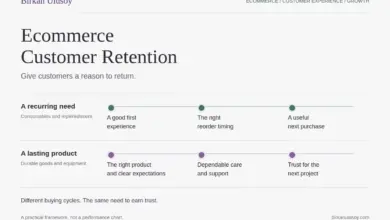
Separate order updates from optional marketing. Send useful setup, care, or usage guidance, then consider relevant follow-up according to the product’s buying cycle. A commercial refrigerator does not need a monthly replenishment reminder. Check: each message serves the actual product owner. My customer retention guide develops this distinction in detail.
-
Test unsubscribe, suppression, and message identity
Verify the sender, reply route, required business information, unsubscribe behavior, and suppression across connected tools. US commercial-email obligations are explained in the FTC’s CAN-SPAM guide; other jurisdictions can impose different consent rules. Check: someone who opts out stops receiving the relevant marketing without losing necessary order updates.
Completion gate: subscription, welcome, purchasing, and opting out behave as intended. For examples of practitioners and approaches worth studying, see my ecommerce email marketing article.
11. Prepare the first campaign, not every possible campaign
The early objective is to learn something useful with controlled downside. I would rather run one coherent offer-to-landing-page test than spread a small budget across five channels that cannot generate interpretable results.
-
Select one audience, offer, and destination
Specify who the campaign is for, the decision it helps with, and the page that continues the same conversation. A category campaign should not dump visitors on a generic homepage when a useful category page exists. Check: the creative, landing page, price, and availability agree.
-
Create a compact library of useful launch content
Prepare an explanation of the problem, a product demonstration, an honest comparison, a delivery answer, and a follow-up message. Adapt them to the chosen channel instead of publishing identical material everywhere. Check: each piece helps the intended customer make progress rather than merely announcing that the store exists.
-
Connect advertising and catalog assets only when needed
When paid acquisition is part of the plan, verify ownership, billing, approved creatives, feed readiness, and the required conversion integration. Audit duplicate browser and server events using the platform’s current instructions. Respect applicable privacy requirements. Check: account setup is complete without activating uncontrolled spending or unnecessary tracking.
-
Set a bounded test budget and review schedule
Choose a spending ceiling the business can afford to lose, a review date, and operational stop conditions. Use the contribution model rather than a competitor’s reported return on ad spend. Check: there is a clear owner who can pause spend, and no assumption that the first test must immediately become profitable.
-
Record customer questions alongside campaign results
Collect objections from support, on-site search, sales conversations, and comments. Separate a lack of qualified traffic from a lack of product fit or trust. Check: the review produces a specific next change, such as explaining delivery access, rather than the reflexive conclusion that more traffic is always the answer.
Completion gate: the first campaign is a bounded learning exercise with a coherent customer journey and someone accountable for the result.
12. Run the complete customer journey before scaling
I want launch testing to feel like buying, not like inspecting a theme. Use a phone, arrive through an actual campaign link, ask a question, place an order, and follow it through the operating system.
-
Run checkout tests through the supported payment process
Test success, failure, cancellation, and refunds using provider-approved test methods. Shopify documents its options in Placing a test order. Check any controlled live test with the provider’s rules and potential fees. Check: test mode is turned off before accepting real orders and no test order enters fulfillment unintentionally.
-
Test the storefront on mobile and with a keyboard
Check navigation, search, variants, consent controls, forms, sticky elements, and checkout. Inspect text size, focus visibility, errors, and whether a keyboard or assistive workflow can complete key tasks. Check: banners and floating controls do not cover the buying or support actions on a small screen.
-
Check speed using both lab tests and real-user evidence
Start with representative product, category, and campaign pages. Optimize oversized images and unnecessary scripts before adding more apps. Google’s good Core Web Vitals thresholds are LCP at most 2.5 seconds, INP at most 200 milliseconds, and CLS at most 0.1, evaluated at the 75th percentile. See Web Vitals. Check: lab results are not presented as proof of field performance; a new store may lack sufficient field data.
-
Verify communications and measurement after the order
Confirm customer notifications, staff alerts, fulfillment tasks, stock changes, the single recorded purchase, and refund handling. Keep test orders identified in reporting. Check: the same order can be followed across the store, delivery system, and measurement tools without assuming every system uses identical revenue definitions.
-
Make an explicit go, pause, or limited-launch decision
Review blockers, owners, and evidence. A limited launch can exclude unsupported regions or unfinished categories. It should not knowingly accept orders the business cannot handle. Assign launch-day monitoring and a rollback or pause procedure. Check: the person approving promotion understands what has been tested and what remains uncertain.
Completion gate: readiness has been demonstrated by a journey, not declared by a launch date. Shopify’s official setup checklist is a useful companion for platform-specific administration; this guide adds the marketing operating model around it.
How the checklist changes for different ecommerce businesses
Scenario A: a commercial refrigeration store
This hypothetical launch is close to the category I work with at Atlantic. A restaurant owner is not simply choosing a product photograph. They may need to confirm capacity, electrical requirements, doorway clearance, delivery access, warranty coverage, and whether the equipment can arrive when the business needs it.
I would prioritize verified product information, a monitored sales address, clear freight explanations, and an inquiry process that captures useful requirements without making the form exhausting. The first campaign would lead to a carefully prepared product or category page, with a route to competent help.
Where supplier MAP terms constrain advertised prices, I would review those terms before proposing incentives. The differentiation may be better guidance, clearer information, and dependable communication rather than a lower advertised price. This is an operating proposal, not a claim that every supplier’s agreement is identical.
The launch test: a customer asks about delivery access, receives an accurate answer, places the appropriate order, and gets correct next steps. A checkout completion by itself would not prove this store is ready.
Scenario B: a small coffee subscription brand
For this illustrative store, the important questions are different: taste, grind, freshness, delivery frequency, quantity, and subscription control. I would prioritize product selection help, clear recurring-charge terms, accurate scheduling, and accessible pause or cancellation routes.
The welcome content might help someone choose the right grind. Post-purchase education could improve preparation. A later replenishment message should reflect actual consumption and subscription status, not a fixed schedule applied to every buyer. The store must avoid sending “buy again” promotions that conflict with an already scheduled shipment.
The launch test: the customer understands whether the purchase is one-time or recurring, receives the intended item, and can manage the agreement. The same 60-point framework applies, but the most important evidence changes with the product and buying cycle.
What to do in the first 30 days after launch
Days 1-3: watch the promises. Review orders, payment exceptions, support messages, delivery information, and tracking. Correct misleading information immediately. A small number of real customers can reveal obvious operational failures even when there is not enough traffic for statistical conclusions.
Days 4-7: fix repeated uncertainty. Turn recurring questions into clearer product information, policy explanations, and support answers. Check search and feed diagnostics. Confirm that welcome and transactional messages reach the right people without overlap.
Week 2: review one acquisition path. Trace the chosen campaign from its audience and creative through the landing page and purchase or qualified inquiry. Look at the behavior and questions, not only attributed revenue. Avoid changing the audience, offer, landing page, and price simultaneously if you want to understand what helped.
Week 3: publish decision-supporting content. Build the most useful buying guide, comparison, compatibility answer, or demonstration identified by real customer questions. Link it to the relevant category or product. Content becomes more valuable when it answers an observed obstacle rather than filling a publishing calendar.
Week 4: review contribution and capacity. Reconcile valid orders, refunds, variable costs, and acquisition spending. Decide whether to increase the existing experiment, improve the offer, or pause. Check whether support and fulfillment could handle more demand before asking marketing to generate it.
This is a working sequence, not a guarantee of profitability in 30 days. SEO, customer retention, and buying cycles need appropriate observation windows. A new store should not pretend to have reliable lifetime value just because a spreadsheet has a column for it.
Ecommerce launch checklist: frequently asked questions
What email accounts does a new ecommerce store need?
Begin with a monitored general address and support route. Add sales, wholesale, returns, or press addresses only when someone owns the work. Aliases can simplify routing, but you still need authorized sending and reply handling. Separately verify order notifications, password resets, and form alerts.
Do I need every social media account before launching?
No. Reserving relevant handles can protect consistency, but maintaining every platform is unnecessary. Start with the channels that match your customers and that your team can support. A complete, useful presence on one channel is more valuable than several neglected profiles linked from the website.
Should SEO or advertising come first?
Basic discoverability, a useful landing page, and a functional customer journey should precede serious promotion. Advertising can then test demand while search visibility develops. Neither should be used to compensate for inaccurate product information, a broken checkout, or an offer with no viable economics.
Can I launch before every checklist item is complete?
Yes, if the unfinished items are noncritical for the launch scope. Do not accept orders with broken payment, misleading availability, or no support route. Limit the geography, assortment, or campaign instead. Record why an item is not applicable rather than checking it off as if it had been tested.
How much should I spend on the first campaign?
There is no responsible universal number. Start with contribution economics, the cost of learning in the chosen channel, available cash, and what you can afford to lose. Set a cap and stop conditions. A platform’s suggested daily budget is not your business’s profit model.
What should I avoid installing at launch?
Avoid tools with no defined owner or business purpose, especially overlapping analytics, popups, review widgets, and automations. Every integration can add maintenance, privacy considerations, or performance cost. Choose the smallest reliable system that supports the first customer journey, then add capabilities for demonstrated needs.
Will completing this checklist guarantee search rankings?
No. It improves readiness and removes avoidable obstacles, but rankings also depend on competition, relevance, content quality, reputation, and time. Judge progress through useful indexed pages, qualified discovery, customer understanding, and business outcomes rather than promising a position you cannot control.
The first marketing win is a business that keeps its promise
I do not see business email, product data, customer support, analytics, and search visibility as disconnected setup chores. Together, they determine whether the attention a store earns turns into a good customer experience.
A customer does not experience the organization chart. They experience one business: the advertisement, the product page, the checkout, the email, the delivery, and the answer when something needs clarification. Every break between those moments becomes part of the brand.
Build the connections before increasing the volume. That is the foundation I want in place when an ecommerce store begins marketing, and the foundation I return to when an established store is spending more without becoming better.