A store can publish every day and still leave its customers with unanswered questions. The blog looks busy. The social accounts look active. But the buyer still cannot tell which product fits, why one option costs more, or what happens after delivery.
That is the problem I want content marketing to solve. My starting point is not how many articles a store should publish. It is which decisions customers need help making, and what evidence would help them make those decisions confidently.
This guide explains how I would build an ecommerce content marketing strategy around those decisions: choosing topics, matching them to the right pages, producing useful assets, distributing them, and measuring more than page views.
What is ecommerce content marketing?
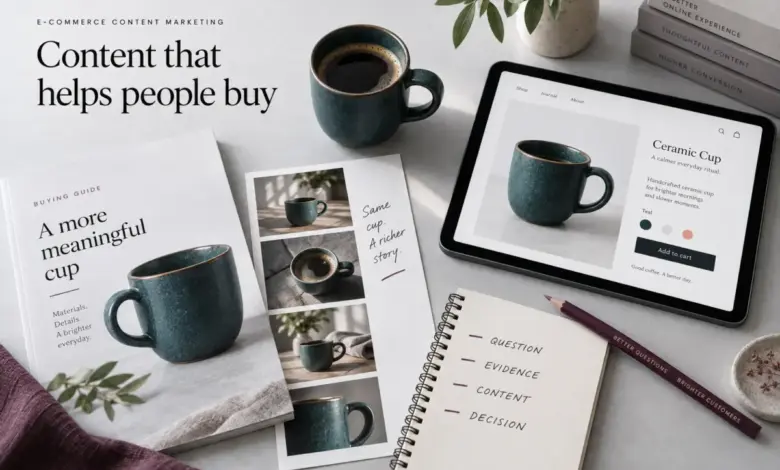
Ecommerce content marketing is the planned creation and distribution of useful information that helps people discover, evaluate, buy, and get value from products. It includes articles and videos, but also buying guides, comparison pages, product demonstrations, emails, and care resources.
A buying guide might attract someone who is still researching. A demonstration might remove a doubt immediately before purchase. A care email might make the product easier to use afterward. These are different jobs, but they belong to the same customer experience. Shopify’s overview of ecommerce content marketing likewise covers content as a way to attract and retain customers, rather than treating it only as blogging.
The distinction matters: content marketing is not the same as SEO, although search can distribute it. It is not the same as social media, although social platforms can carry it. And it is not the whole of marketing. For that wider context, see my guide to what marketing actually means.
The strategy in seven steps
- Choose a commercially relevant product category and customer problem.
- Collect real questions from customers and your own data.
- Match each question to the right page or content format.
- Prioritize topics where you can contribute credible evidence.
- Create a useful answer and a relevant next step.
- Distribute the answer beyond its original publishing location.
- Measure, update, and improve it.
Below, I use a hypothetical drinkware store to make the process concrete. The examples are planning exercises, not client case studies or reported performance results.
1. Start with a category, not a publishing quota
A small team cannot build a useful library about everything at once. I would begin with one category that matters to the business and that the team can support with real knowledge.
Consider product availability, margin, customer demand, operational capacity, and the information already missing. A seasonal product with uncertain stock may not be the best foundation for a year-round guide. A high-traffic topic may be a poor choice if none of the visitors are likely to need what you sell.
For the example store, suppose the focus is ceramic mugs. The goal is not simply to rank for coffee-related searches. It is to help people choose an appropriate mug and understand the product before buying it.
I would write a short objective: Help customers choose the right mug size and shape for their routine, then make the relevant collection easy to explore. That objective gives the team a way to reject ideas. A general history of coffee may be interesting, but a photographed size comparison is closer to the chosen problem.
This is also where content becomes a response to competition. When several stores sell similar products, better explanations and evidence can create a meaningful difference. I explore that idea further in selling what everyone else sells.
2. Build a customer-question inventory
Keyword research is useful, but I would not let it be the only source of ideas. Begin with the questions the business already encounters:
- Customer support: repeated questions about fit, compatibility, delivery, or care.
- Sales conversations: objections and comparisons that delay a decision.
- Returns feedback: gaps between what customers expected and what arrived.
- On-site search: what visitors try to find, including searches that return little useful information.
- Search Console: queries and pages already receiving search impressions or clicks.
- Product reviews: recurring use cases and limitations, considered in context rather than copied as universal claims.
Use only information you are authorized to access. Remove identifying details from support examples. A customer’s private message is research input, not automatically a testimonial you can publish.
Record the question in the customer’s language before rewriting it as a keyword. For example: “How big does this feel in your hand?” is more useful input than a vague instruction to write about mug benefits. It suggests a photograph, dimensions, and a comparison, not just another paragraph.
Each question should have a proposed answer owner. Product specifications may need a product manager. Delivery information may need operations. A writer should not have to invent missing facts to finish a brief.
3. Match the question to the right content format
Not every search deserves a blog post. Before choosing a format, inspect the current results for the target query and consider what a visitor is trying to do. Results can differ by location and change over time, so use them as evidence of intent, not a permanent template.
Buying guides: help someone choose
A question such as “What size coffee mug should I buy?” can justify a guide with dimensions, capacity comparisons, and photographs. Explain trade-offs and identify who each option suits. Link to relevant products where the information naturally supports a choice.
Comparison content: make differences understandable
A comparison should explain meaningful differences, not manufacture a winner. Compare the same attributes across options and distinguish measured facts from preferences. If you have not tested a product, do not imply that you have.
Collection pages: support shopping
A visitor searching for a product category may want to browse immediately. A useful collection page can combine products, clear filters, a concise explanation, and relevant buying guidance. Sending that person through a long article first may add friction rather than value.
Product pages: resolve product-specific uncertainty
“Is this exact mug dishwasher-safe?” belongs primarily on the product page, supported by verified manufacturer guidance. A general article cannot repair missing product-specific information. My guide to improving product pages with AI discusses how to improve clarity without inventing facts.
Demonstrations and post-purchase resources: show and support
A short video can demonstrate scale, handling, or how a component works more clearly than text alone. After purchase, a useful care guide or setup email can answer the next set of questions. Use the format that explains the issue best, not the format your team happens to produce most often.
4. Prioritize useful opportunities, not just large keywords
I would assess a topic against five questions:
- Commercial relevance: does answering it support a category or customer relationship that matters?
- Customer uncertainty: is it a recurring obstacle or merely an interesting subject?
- Evidence advantage: can we contribute photographs, measurements, expertise, or a clearer explanation?
- Search and distribution opportunity: where could the right audience encounter this answer?
- Effort and maintenance: can we produce it accurately and keep it current?
This is an editorial prioritization method, not a formula for predicting Google rankings. Search volume and competition estimates can inform the decision, but they do not measure every business benefit. A low-volume question that repeatedly blocks a valuable order may deserve attention before a broad, high-volume topic.
I would also separate new content from improvements to existing content. If a collection page already attracts the right visitors but does not answer a common question, improving that page may be more useful than publishing a second URL.
A worked example: one product family, several useful answers
Here is how the hypothetical mug category could become a connected content plan:
- Question: Which size fits my usual drink? Asset: a size guide with verified capacities and scale photographs. Next step: browse the matching collection.
- Question: How do these two shapes differ? Asset: a side-by-side comparison with the same views and measurements. Next step: compare the two product pages.
- Question: Will it fit beneath my coffee machine? Asset: exact product dimensions and a measurement diagram. Next step: check the customer’s available clearance.
- Question: Can I put it in the dishwasher? Asset: verified care information on each relevant product page. Next step: read the care guide if needed.
- Question: Is it suitable as a gift? Asset: accurate packaging photographs and delivery information. Next step: choose an available gift option.
Notice that this plan does not require five blog articles. It requires five good answers. Some should live within existing pages. Others deserve their own resource. The connections between them matter as much as the individual assets.
The same logic applies to B2B stores, but the questions often involve compatibility, specification documents, delivery constraints, or purchasing approval. Do not disguise a product requirement as a generic lifestyle article. For that context, see building a Shopify website for a B2B company.
5. Write a brief that requires evidence
A brief should make the writer’s job clearer without prescribing a meaningless word count. This is the structure I would use:
- Customer and situation: who needs the answer, and what are they trying to do?
- Primary question: the single decision the page must help resolve.
- Search intent and page type: why this should be a guide, collection page, product section, or video.
- Essential answers: what the reader must understand before leaving.
- Evidence: the measurements, original images, demonstrations, documents, or expert input required.
- Limitations: what we cannot verify or should not generalize.
- Next step: a relevant product, collection, comparison, or support resource.
- Review owner: who checks factual accuracy before publication and when it needs another review.
A useful brief for the size guide might require photographs of the actual mugs from a consistent angle, capacities checked against specifications, and a clear explanation of what each measurement represents. It should not ask the writer to declare one size “perfect for everyone.”
Google’s people-first content guidance emphasizes original value, trustworthy information, and a satisfying answer. It also explicitly rejects the idea that Google has a preferred word count. The practical lesson is to earn the length of the page with useful material, not stretch an answer to meet a target.
6. Make content discoverable without weakening it
Search optimization should make a useful page easier to find and understand. Give it a descriptive title, a clear main heading, and sections that follow the reader’s questions. Place the direct answer early when the question allows one; use the rest of the page for explanation, evidence, and important exceptions.
Build internal links that reflect a real relationship. The size guide can link to suitable collections. Product pages can link back to the size guide near dimensions. A care resource can be linked from both the product page and the post-purchase email.
Use descriptive link text rather than a repeated “click here.” Google recommends crawlable links and meaningful anchor text in its link best practices. Do not add every keyword to every anchor; help the reader understand the destination.
Avoid making near-identical pages for tiny keyword variations when one page can answer the same underlying need. Conversely, do not force shopping intent and a complex technical explanation into one page just because the terms overlap. The deciding question is whether the user is doing the same job.
For AI-assisted discovery, I would still focus on explicit answers, verifiable information, clear context, and accessible pages. Google’s guidance says its AI search features do not require special optimizations or a special schema. Neither traditional rankings nor AI citations are guaranteed by a particular format.
7. Plan distribution before publication
A useful guide should not rely on someone eventually finding it in search. Decide who else can use the answer and in what form.
The mug size comparison could become a short demonstration, an email explaining a common buying mistake, and a support-team response to a recurring question. The collection page can summarize the key choice and link to the full guide. Each version should suit its context rather than repeat the same text everywhere.
I would give a finished asset a small distribution checklist: relevant site links, one useful email placement, one platform-native social version, and a note for the customer-facing team. Not every piece needs every channel. If the question matters mostly after purchase, a timely customer email may be more valuable than a public social campaign.
Distribution also belongs in your schedule. My Shopify content calendar guide covers the planning side; the strategy here determines what earns a place in that calendar.
How to measure ecommerce content marketing
I would separate measurement into discovery, useful behavior, and business outcomes. That keeps a traffic increase from being mistaken for a complete success.
- Discovery: relevant search queries, impressions, clicks, and the pages people land on.
- Useful behavior: movement from a guide to a relevant collection or product, a meaningful email signup, or use of a comparison resource.
- Business outcomes: purchases, qualified inquiries, repeat orders, and product-related support patterns, where you can measure them responsibly.
For event-based measurement, the implementation has to be correct. Google’s GA4 ecommerce purchases report documentation explains the ecommerce reporting context; a report cannot compensate for missing or incorrect events. Validate transactions, values, and currency before relying on revenue figures.
Distinguish content people first land on from content they read later. A product page may receive the final purchase interaction while a guide helped with an earlier decision. Attribution reports are useful descriptions within their rules and available data; they are not proof of causation.
A before-and-after comparison also needs care. Seasonality, promotions, stock availability, channel mix, and tracking changes can all affect results. Where traffic is sufficient, a well-designed experiment may help isolate an effect. Otherwise, treat the evidence as directional and record competing explanations.
For a small store, a simple monthly review can be enough: Is the page reaching the intended audience? Are readers finding the relevant next step? What questions remain unanswered? What should we improve next?
A practical 90-day content marketing plan
Days 1-15: choose the problem and establish a baseline
Select one category. Collect customer questions, inspect existing pages, check search intent, and confirm that measurement works. Create a backlog, but choose only a few priorities. Record the current state before making changes.
Days 16-30: improve the buying experience first
Fix essential information on the relevant product and collection pages. Prepare original assets and publish one substantial guide that answers a real decision. Ask someone unfamiliar with the category to identify what still feels unclear.
Days 31-60: connect and distribute
Add an appropriate comparison or demonstration. Connect related pages and reuse the strongest explanations in email, social content, and customer support. Publish only at a pace the team can review accurately.
Days 61-90: review the evidence and expand selectively
Look at search visibility, reader behavior, and feedback. Improve weak answers and broken journeys before doubling the publishing volume. Expand to another category when you can explain what the first one taught you.
This is a work plan, not a promise that organic search will reach a particular result within 90 days. Competitive topics may take longer, and some assets may prove more useful in sales or support than in search.
Content marketing mistakes I would avoid
- Publishing to maintain a streak. A daily schedule is useful only when each piece earns its place.
- Outsourcing the facts. Writers and AI tools cannot replace missing product knowledge.
- Inventing experience. Do not describe a product test, interview, or client result that did not happen.
- Forcing a sale into every answer. Sometimes the useful next step is a measurement, a comparison, or a support contact.
- Leaving successful pages unattended. Specifications, available products, policies, and links can change.
- Choosing traffic over relevance. A smaller, relevant audience can be more useful than a large audience with no reason to buy.
Frequently asked questions
What is the best content marketing format for an ecommerce store?
It depends on the question. Use a guide for a considered choice, a collection for browsing, a product page for exact specifications, and a demonstration when the answer is easier to show. Start with the buyer’s task, not a preferred format.
How often should a Shopify store publish content?
There is no universally correct frequency. Choose a pace that leaves time for research, factual review, distribution, and updates. Improving an important existing page can be a better use of the week than publishing another weak article.
Can AI help with content marketing?
Yes. It can organize anonymized questions, suggest outlines, and help adapt an approved explanation to different formats. Product facts, claims, quotations, and examples still need verification. AI should not invent the evidence that makes content trustworthy.
Should every article link to a product?
No. Link where the destination genuinely helps the reader. A collection, comparison, care guide, or contact page may be more appropriate. Relevance matters more than mechanically adding a product link to every paragraph.
Is content marketing useful for B2B ecommerce?
Yes, particularly when buying requires research, compatibility checks, documentation, or approval from several people. The content should help those decisions with reliable information, not replace technical specifications with promotional language.
The goal is a better decision, not a bigger archive
The content library I would want for an online store is not necessarily the largest one. It is the one that helps the right customer understand the product, compare the options, and move forward without avoidable uncertainty.
Choose one category. Identify the question that matters most. Gather the evidence. Publish the answer where the customer needs it. Then learn from what happens. That is a stronger foundation than asking what to post tomorrow.
Helpful content should keep working after the first order. My ecommerce customer retention guide explores how product education, support, and relevant follow-up can contribute to the next purchase.
Building the foundations first? My 60-step ecommerce launch checklist connects business email, product information, checkout, measurement, and your first marketing campaigns.
Content also belongs where shoppers compare products. My ecommerce category page SEO guide explains how collection copy, product information, and internal links can support that decision, with examples from Atlantic and Montoddler.